

Let’s talk about something every teacher has to deal with, but very few of us actually enjoy doing:
assessment.
You know the drill. Homework. Quizzes. Projects. Midterms. Final exams. Different groups of students. Different starting points. Different levels of support.
And somehow, at the end of it all, you’re expected to turn that beautiful, wonderfully complicated collection of evidence into… a grade.
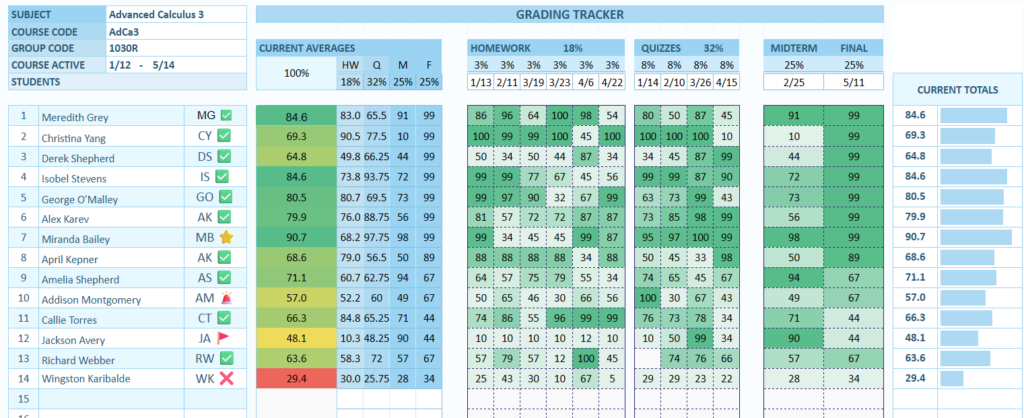
For years, I had my own little system for doing exactly that.
And honestly?
I gatekept it. 😂
Not because I didn’t want to share, but because it was one of those teacher tools that had quietly become my thing. I had used it for years, tweaked it, improved it, adjusted the formulas, and made it work the way I actually wanted assessment to work.
But eventually I thought:
Why am I keeping this to myself?
So I turned it into something other teachers can actually use too.
Meet the Sheetsfairy Progress Tracker. 🧚♀️📊
Assessment should tell a story — not just produce a number
One of the things I have always struggled with in traditional gradebooks is that a final grade can sometimes hide a lot of information.
Two students can receive the same grade while having completely different learning journeys.
One might consistently complete homework, perform well on quizzes and steadily improve.
Another might struggle with homework but absolutely shine in exams.
And that’s where I wanted my Progress Tracker to be different.
Instead of simply throwing everything into one giant percentage, you can decide what actually matters in your assessment.
Different student levels
Every classroom is different.
And especially when you work with students who have very different starting points, expecting everyone to fit neatly into the same box doesn’t always make sense.
That’s why the Progress Tracker allows you to organize your students into different level groups.
You can use them however they make sense for your teaching:
- Level 1 → students needing significant support
- Level 2 → developing
- Level 3 → working at the expected level
- Level 4 → advanced
Or give the groups your own names.
The important thing is that you decide what the levels mean.
You decide what counts toward the grade
This is probably my favorite part.
You can define how much each assessment category contributes to the final result.
For example:
Homework — 20%
Quizzes — 20%
Midterm — 25%
Final Exam — 35%
Or maybe homework is more important in your classroom.
Perhaps you want:
Homework — 30%
Quizzes — 20%
Midterm — 20%
Final Exam — 30%
No problem.
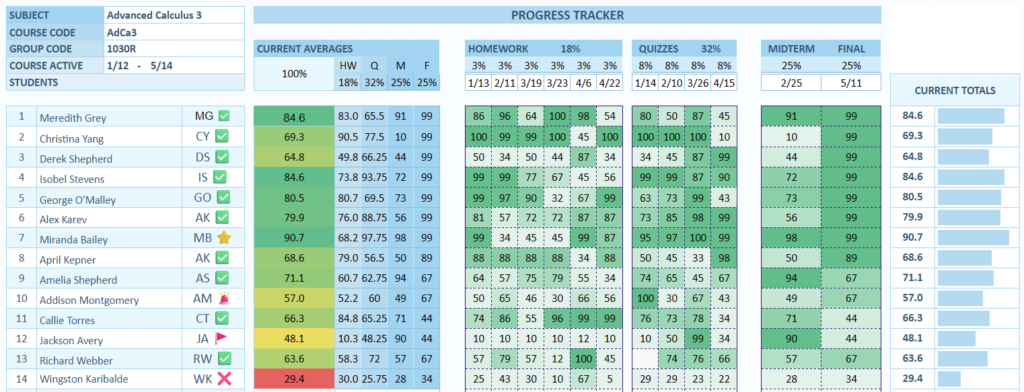
The Progress Tracker lets you set the number of assignments and the percentage weighting for each category.
And that means you aren’t adapting your assessment system to someone else’s spreadsheet.
The spreadsheet adapts to yours.
Homework, quizzes, midterm & final exam — all in one place
You can set the number of:
📚 Homework assignments
📝 Quizzes
📖 Midterm exams
🎓 Final exams
…and define how much each category contributes to the overall assessment.
The formulas do the heavy lifting for you.
Because let’s be honest:
Teachers have enough things to calculate.
We really don’t need to spend our evenings manually calculating weighted averages when a spreadsheet can do it for us.
And then there was the Pro version… 👀
This is where my little teacher spreadsheet got a glow-up.
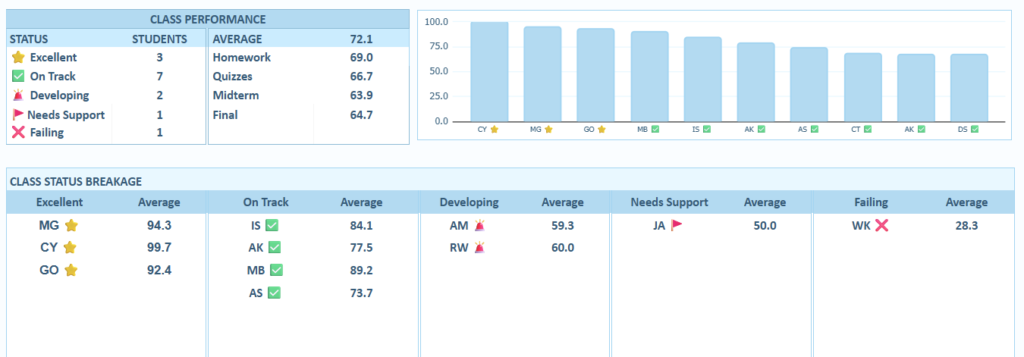
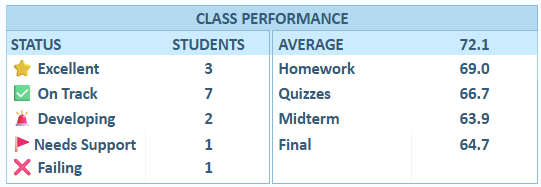
The Progress Tracker Pro version includes charts that make student progress much easier to see at a glance.
Instead of staring at rows and rows of numbers, you can actually see what is happening.
And because student data deserves to be handled carefully, the tracker can display student initials instead of full names.
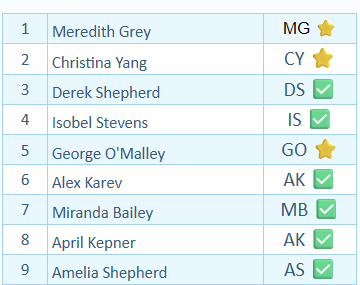
That means you can keep the identifying information out of charts and visual summaries while still knowing exactly which student you’re looking at.
It’s a small feature.
But it’s one of those small features that makes me feel much better about using assessment data in a spreadsheet.
But wait — there is a FREE version! 💙
I didn’t want this to become one of those products where the useful stuff is locked behind a paywall.
So yes — there is also a FREE version.
And it contains everything you need to get started with the Progress Tracker.
At least for now, it comes in one of my favorite Sheetsfairy colors:
🫐 Blueberry Milkshake
It’s soft, playful and just the right amount of sweet without turning your gradebook into a unicorn exploded all over it.
😂
The Pro version gives you the extra visual features and charts, but the Free version is genuinely useful on its own.
Because sometimes you just need a good spreadsheet that does the job.
Should I make more colors?
And now I have a question for you. 👀
The Free version currently comes in Blueberry Milkshake.
But Sheetsfairy is becoming a little bit of a pastel color universe…
🌿 Mint
🩵 Turquoise
🩷 Pink
💜 Lilac
🫐 Blueberry
So…
Would you like to see the Progress Tracker in more colors?
Maybe a:
🌿 Mint Matcha version?
🩷 Strawberry Cream?
💜 Lavender Dream?
🩵 Turquoise Sorbet?
Or should Blueberry Milkshake remain the original?
I genuinely want to know.
Because one thing I’ve learned from creating teacher resources is that sometimes the tiniest details — a color you love, a layout that makes sense, a formula that saves you ten minutes — are what make a tool something you actually want to use.
From my secret teacher spreadsheet to yours
So yes.
I finally stopped gatekeeping my assessment system. 😂
After years of using it myself, tweaking it and quietly relying on it behind the scenes, I’m really excited to finally put the Sheetsfairy Progress Tracker into the hands of other teachers.

Whether you start with the Free Blueberry Milkshake version or go for Progress Tracker Pro with charts and privacy-friendly initials, I hope it gives you one thing every teacher deserves:
a little less time fighting spreadsheets, and a little more time doing what you actually came to school to do — teach. 💚
And if you have a color request…
Well.
The Sheetsfairy is listening. 🧚♀️✨
